Galaxy Attack: Shooting Game
- 4.6
- Rating
- 100.00M
- Installs
- Free
- Price
 Analysis by App-foxy
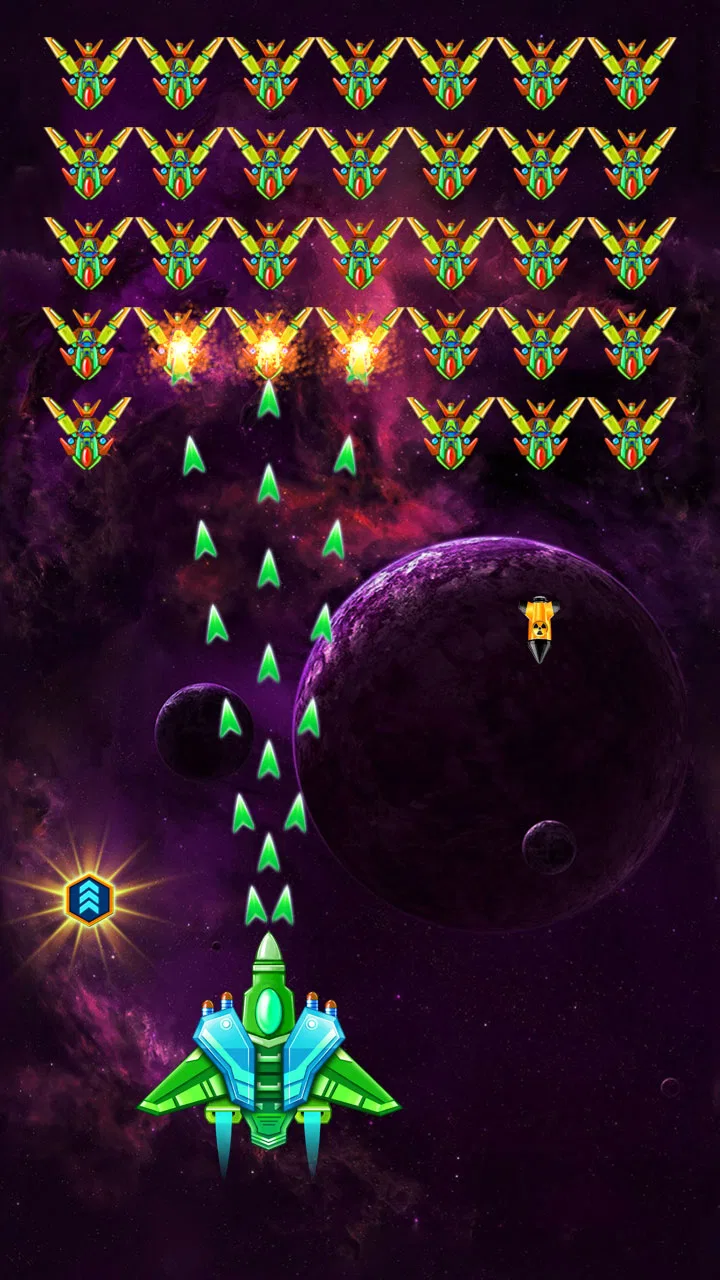
I approached Galaxy Attack: Shooting Game as the kind of arcade title you open when you want immediate action rather than a long setup or a complicated story. It puts the focus on controlling a ship, reacting to incoming threats, and trying to survive long enough to improve your run. That simple promise is also its main appeal: I can start quickly, understand the basic objective almost immediately, and play in short bursts without needing to remember a large set of rules.
It is a free game from 1SOFT, rated for Everyone, and it sits firmly in the classic mobile shooter tradition. The store summary frames it as a fight to save the galaxy from alien attackers, but my useful takeaway is more practical: this is an arcade game built around repeated attempts. You play, make mistakes, learn the rhythm of an encounter, and try again with better timing. That loop will feel familiar to anyone who enjoys old-school space shooters, although the mobile format makes it easier to fit into a commute, a break, or a few minutes before bed.
The game has a 4.6 average from around 2.5 million ratings, with more than 100 million installs. Those figures suggest that its straightforward format has reached a very broad audience. They do not mean every player will enjoy it equally. If you want a deep role-playing game, a calm puzzle experience, or a shooter designed around extended multiplayer sessions, this is probably not the right direction. If you like quick reflex challenges and gradual progress, it is much easier to recommend.
You May Also Like

 Blood Strike: 2.5 Anniversary
Blood Strike’s Loadouts Turn Every Drop Into a Tactical Gamble
A close look at Blood Strike’s custom loadouts: how fast access to signature weapons reshapes its battle royale rhythm, rewards preparation, and narrows the gap between fights.

 Pandora - Music & Podcasts
Pandora’s Music Is Easy to Start, but Harder to Recover
Pandora’s strength is its low-effort path from a seed to a station. Its weak spot is how much confidence it asks you to place in connection, setup, and quiet recovery.

 8 Ball Pool
 Is Built on Rivalries, Rematches, and Routine
A close look at the rivalries, rematches, shared routines, and unanswered safety questions that turn a quick pool match into a persistent mobile community.

 Samsung Music
’s Quiet Strength Is Playing What You Already Own
Its reach comes less from spectacle than from dependable access to a personal library. That simplicity is both the app’s strongest retention engine and its ceiling.

 AccuWeather: Weather Radar
AccuWeather Review: A Quick, Clear Forecast for Everyday Decisions
For everyday plans, the best forecast is the one you can understand quickly. AccuWeather makes rain timing, radar, and local conditions easy to act on, with a few trade-offs.

 Hill Climb Racing
Why Hill Climb Racing Still Turns Crashes Into One More Run
A tiny car, a bumpy hill and one more upgrade: Hill Climb Racing keeps resurfacing because its simple chaos makes every near-miss feel personal.
More From Our News Desk



Getting past the first points of friction
Before settling into a longer run, I find it helps to separate a genuine control problem from the ordinary learning curve of an arcade shooter. A steady grip, a responsive screen, and one deliberate movement style give me a fair baseline; from there, I can focus on reading enemy patterns instead of second-guessing every swipe. That small reset makes the next attempts more useful and sets up a closer look at how the game’s presentation supports its pace.
What usually makes the opening feel harder than expected
The first obstacle is not necessarily the controls. It is learning how much attention the game demands. A shooter like this can look simple because the screen is uncluttered at the beginning, but incoming enemies, projectiles, movement limits, and attack timing quickly compete for your focus. I found that new players often concentrate on firing and forget that survival depends more on positioning than on constant aggression.
My first practical tip is to treat the lower part of the screen as a safety zone rather than moving randomly across it. Small, deliberate movements are easier to correct than wide swipes. When several threats appear, I watch the gaps between them instead of chasing a single target. This is one of the most useful habits to develop early because it reduces panic and makes later attempts feel more controlled.
Another point of friction is the expectation that every failed attempt means the game is unfair. In reality, arcade shooters often reveal their patterns only after repetition. I try to identify what caused the failure: did I move too late, focus on an attractive target, or leave myself without room to escape? Naming the mistake makes the next attempt useful. Simply rushing back in usually produces the same result.
Simple setup checks before blaming the game
Because this is a mobile game, the first setup check is basic but important: make sure the phone has enough free space for normal operation and that the operating system meets the stated minimum of Android 7.0. The current version is 70.7, so keeping the app updated through the usual store process is sensible when an update is available. I would also close demanding apps if the phone is already struggling, especially before deciding that the controls are unresponsive.
The game is free to download, but it includes optional in-app purchases ranging from $0.99 to $199.99 per item. That matters before handing the phone to a child, even though the content rating is Everyone. I recommend checking the device's purchase protections and discussing spending expectations in advance. The age rating describes the content, not the financial choices a player might make inside a free game.
I also check the physical playing conditions. A dirty screen, a thick case edge, or a hand covering part of the display can make swipes feel inconsistent. When I want to judge the controls fairly, I play with the phone held securely and use the same finger position for several attempts. This sounds minor, but changing grip constantly can create the impression that the game is behaving differently when the real problem is my interaction with the screen.
A recovery routine for interrupted or disappointing sessions
Short arcade sessions are convenient, but interruptions can break concentration. If the game closes, stalls, or returns me to an unexpected point, I start with safe checks rather than repeatedly tapping the screen. I reopen it normally, confirm that the phone is not overloaded with other active apps, and try again after a brief pause. I avoid immediately clearing storage or removing the app because those actions can create unnecessary complications for local progress or settings.
If an update has just been installed, I give the game one clean restart before judging it. I also check whether the device itself is unusually hot or low on battery. Heat and power-saving behavior can affect how responsive a game feels, and a shooter is particularly sensitive to small delays because timing is central to play. A second test after the phone has cooled down tells me more than a single frustrated attempt.
When a session feels unusually difficult, I do not assume that the latest stage or enemy pattern has changed. I replay an earlier section, if the available progression allows it, to compare my control response and the game's general performance. If movement feels normal there, the problem may be my concentration or the challenge of the current encounter. If every part feels delayed, I look at the device and connection conditions before changing anything more drastic.
Using repetition as a practical workflow
I get more from the game when I divide a session into small goals. Instead of thinking only about reaching the next stage, I might focus on surviving a particular attack pattern, staying near a safer position, or avoiding unnecessary movement. This makes failure informative. It also prevents the common trap of playing too quickly after a loss while still annoyed.
One less obvious trade-off is that aggressive play can feel rewarding while quietly making survival harder. Chasing every target may improve the sense of action, but it can pull the ship toward dangerous areas or leave less room to react. I prefer to clear what is immediately threatening first, then use any opening to attack more confidently. That approach may feel slower, yet it produces more consistent runs.
I also recommend taking a short pause after several failed attempts. In a reflex game, fatigue changes the quality of decisions before the player notices it. A brief break can be more effective than spending resources or making hurried purchases. This is especially relevant for younger players, who may interpret repeated failure as a reason to keep trying without changing their approach.
When the app may not be the real cause
Not every problem that appears while playing comes from the game. If the display is generally slow, other apps are also freezing, or touch input is unreliable outside the shooter, the phone is the more likely source. Testing another ordinary touch interaction can help separate a game-specific issue from a broader device problem. I would not uninstall a working game simply because the whole phone has become sluggish.
Network conditions can also confuse the diagnosis. Even when the core action feels like a self-contained arcade experience, store checks, updates, advertisements, or other connected elements may behave differently on a weak connection. If loading takes unusually long, I try a stable connection and avoid switching repeatedly between networks during the same session. When the game itself runs smoothly after loading, that points away from touch performance and toward connectivity.
Notifications are another practical distraction. A message banner or incoming call can interrupt a carefully timed movement, and the resulting failure may look like a control problem. For focused play, I use the phone's normal interruption controls where appropriate. I do not need a special gaming setup, but reducing avoidable interruptions makes the experience noticeably fairer.
Finally, I consider expectations. The title is an arcade shooter, not a slow strategic simulator. If I dislike repeated attempts, quick reactions, and gradual mastery, no troubleshooting step will make the design feel relaxing. In that situation, a puzzle game or a turn-based alternative would be a better choice. The game can be functioning perfectly and still not match the way someone wants to spend time on a phone.
How it compares with familiar arcade alternatives
Compared with a traditional console-style shooter, this game is easier to pick up in short sessions and less demanding in terms of remembering a large campaign. That accessibility is its strongest advantage. I can return after a few days and understand the basic action again without studying a manual. The trade-off is that players seeking a richer narrative, extensive customization, or a more elaborate competitive structure may find the format limited.
Compared with very simple endless arcade games, it asks for more attention to patterns and positioning. It is not just something I leave running while distracted. The screen demands active reactions, which gives successful attempts more satisfaction but also makes interruptions more costly. People looking for a completely passive time filler should choose something gentler.
It also differs from premium games that charge once and avoid purchase prompts. Since this title is free with optional purchases, I would approach it with a clear personal rule: play the available progression first, decide whether the core loop is genuinely enjoyable, and only then consider spending. I would never treat a purchase as a substitute for learning movement or timing. Better play usually comes from observation, not from paying to remove frustration.
Who will enjoy it, and who should skip it
I think it suits players who like classic alien-shooting themes, quick restarts, and the satisfaction of improving through repetition. It is also a good fit for families looking for an accessible action game, provided an adult manages purchase settings and explains that free installation does not necessarily mean every optional item is free. The Everyone rating makes the content approachable, while the arcade structure keeps the basic idea easy to understand.
I would be more cautious recommending it to someone with limited patience for repeated failure or someone who wants a single uninterrupted story. Players who prefer precise physical buttons may also need time to adapt to touch controls. The game is at its best when the player accepts that a failed run is part of the learning process rather than expecting constant forward progress.
For me, the most practical everyday scenario is a short break during which I want something more engaging than scrolling but less demanding than a long adventure. I can play a few attempts, stop without losing an entire evening, and return later with a clearer idea of what to improve. On a crowded commute, however, interruptions and unstable connectivity can make the experience less pleasant, so I would not rely on it as the only offline entertainment option.
My final view after weighing the friction
Galaxy Attack: Shooting Game is strongest when treated as a compact reflex workout, not as an endlessly expanding substitute for every type of game. Its free entry, familiar arcade structure, broad accessibility, and quick learning curve make it easy to try. The large audience and strong average rating reflect that immediate appeal, while the long-running release history shows that the basic formula has remained relevant to many mobile players.
My recommendation is to install it if you enjoy learning enemy movement, making careful swipes, and improving one attempt at a time. Before playing seriously, confirm that the phone meets Android 7.0 or newer, keep the device responsive, and set sensible purchase protections. If a session behaves oddly, test the phone, connection, temperature, and interruptions before assuming the game is broken.
I would skip it if you want a premium, story-heavy experience, dislike optional purchase systems, or need a game that remains enjoyable while your attention is elsewhere. For everyone else, it is a convincing example of why classic arcade shooting still works on mobile: the rules are easy to grasp, but consistent success requires attention. That balance gives the game enough depth for repeat visits without making the first session feel like homework.
FAQs for Galaxy Attack: Shooting Game
01What is the main objective of Galaxy Attack: Shooting Game?
Galaxy Attack: Shooting Game is an arcade-style shooter where players assume the role of a lone spaceship pilot tasked with defending the galaxy from alien invasions. The primary objective is to defeat waves of enemy ships, collect power-ups, and ultimately face challenging bosses to progress through increasingly difficult levels.
02Are there in-app purchases in Galaxy Attack: Shooting Game?
Yes, Galaxy Attack: Shooting Game offers in-app purchases. Players can buy items such as power-ups, additional lives, and ship upgrades. While the game is free to play, these purchases can enhance gameplay by providing an edge in tougher stages or against formidable bosses.
03Can Galaxy Attack: Shooting Game be played offline?
Galaxy Attack: Shooting Game can be played offline, allowing players to enjoy the action without an internet connection. However, certain features like leaderboard access and in-app purchases require an internet connection, so players will need to be online to fully utilize these aspects.
04What kind of controls does Galaxy Attack: Shooting Game use?
The game uses intuitive touch controls. Players guide their spaceship by dragging their finger across the screen, allowing for precise movements to dodge enemy fire and aim at targets. The simplicity of the controls makes it accessible for players of all skill levels, enhancing the overall gaming experience.
05How does the multiplayer mode work in Galaxy Attack: Shooting Game?
Galaxy Attack: Shooting Game features a multiplayer mode where players can compete against others in real-time battles. Players are matched based on their skill levels, and victories in this mode can earn them rewards and higher rankings. An internet connection is required to participate in multiplayer battles.
Pros
- Engaging and fast-paced gameplay.
- Stunning graphics and visual effects.
- Wide variety of spaceships to unlock.
- Challenging boss battles.
- Frequent updates and new levels.
Cons
- In-app purchases can be pricey.
- Occasional ads interrupt gameplay.
- Requires internet connection.
- Some levels are very difficult.
- Battery drains quickly during play.

Galaxy Attack: Shooting Game
Gallery